You spend hours working on footage, you get it perfect, it looks amazing. Export…and now it looks like trash. Why?
Different devices work in different color spaces with different pixel shapes and sizes. All of these things affect how color looks. Sony devices tend to handle blues and greens exceptionally well, whereas Apple devices display a much broader variety of greens and significantly more yellows.
Canon monitors & sensors do yellows and African American skin tones very well, whilst other monitors may make skin tones appear more “muted” and grey. In addition, your phone likely has smaller pixels / higher pixel density. This will make the details look sharper.
A more explicit example from a 15″ MacBook Pro has a 10-bit 2880×1800 display (can display a little over 1.1 million different colors at 220 pixels per inch covering 99% of the sRGB color space), but a Dell XPS 15 with the 4K UHD (3840×2160) is just a 6-bit display (can display only 262 thousand colors but with 282 pixels per inch and covers 95% of the sRGB color space) — cheaper displays are even worse are reproducing color (source: James McInnis)
3 THINGS TO CHECK
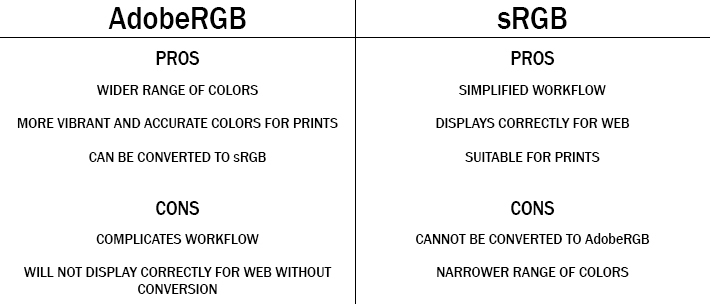
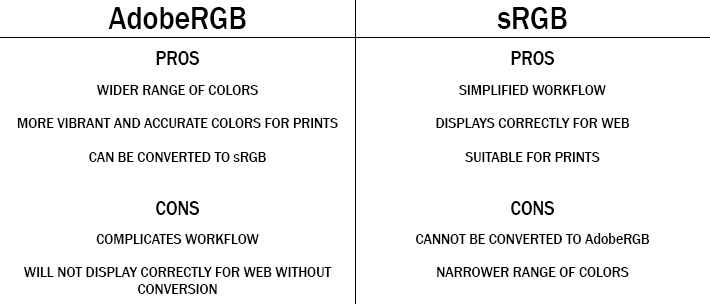
- COLOR GAMUT – Color Spaces are important to understand. Most consumer television / monitors are on the sRGB color space, whilst Apple devices are on the adobe RGB color space.
Adobe RGB has a wide variety of colors that gives a way more accurate image, but it is important to note that it is not always best final product as web 2.0 only allows for sRGB and it is viewed as the universal standard.
It is usually a good practice to start a project in adobe RGB, and save a copy that is converted to sRGB.
- HARDWARE OPTIMIZATION – No surprise here that hardware optimization is one of the first things to check, it makes a huge difference in render previews. If you have noticed a difference between what you have exported vs what you are seeing in the preview, this is the reason.
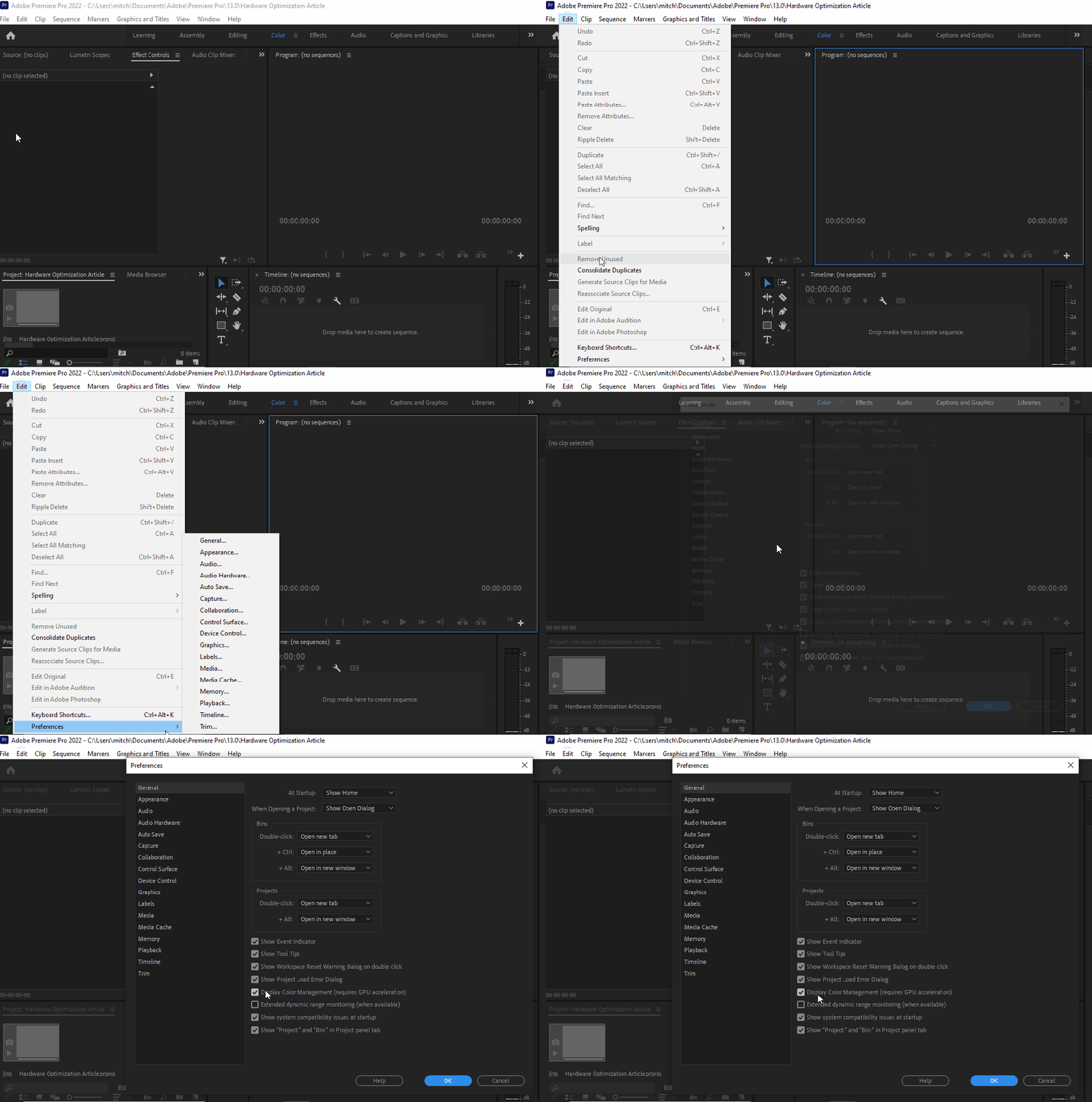
If your issues are color related, you are looking for the place to check is in: Edit > Preferences > General settings.
- COLOR PROFILES & MANAGEMENT – REC. 709 is the standard for all SDR video productions. Rec. 709 displays the same amount of colors as sRGB yet it has a defined gamma of 2.4 (BT.1886), a peak luminance (brightness) of 100 nits, and a D65 white point.
Why is that important? Because these units are best for cross-platform color calibration. MOST MONITORS prosumer included have a much cooler white point. Why? (Insert corporate greed quote here).
Rec. 2020 is fairly new, and a lot of filmmakers choose this option because of the vast upgrade in amount of visible colors. On the flipside, it has caused minor disruptions in the post process pipeline as it clashes with current-gen tech.
There you have it! There are other things you can look into but when managing these 3 very common discrepancies you can usually resolve any issues relating to displaying footage amongst many devices. There could also be calibration issues with your monitor.
If you suspect that is the case, you should check out our article on monitor calibration for Mac & PC.
Written by Cornell Mitchell, 7/4/2022
 NXTLVL Interactive